Huawei OceanStor Dorado All-Flash Storage and Red Hat OpenShift Interoperability Test Report

1 Executive Summary
Axians Global(“Axians”) assessed the interoperability of Red Hat OpenShift and Huawei OceanStor Dorado All-Flash Storage (hereinafter referred to as “the storage” as well). The goal of the assessment is to validate that Red Hat OpenShift is interoperable with Huawei OceanStor Dorado All-Flash Storage.
All the test cases were completed and passed. With regards to the test results, Red Hat OpenShift can recognize and use Huawei OceanStor Dorado All-Flash Storage correctly.In summary, the result of this test proves Huawei OceanStor Dorado All-Flash Storage can be compatible with Red Hat OpenShift.
| Test Scenario | System Involved | Result |
| OpenShift Basic Function – SAN | OceanStor Dorado 6000 | Passed |
| OpenShift Basic Function – NAS | OceanStor Dorado 6000 | Passed |
In this document, you will find details on the above test cases and the captured output. The procedures conducted in the tests are referenced from standard online documentation from Red Hat and Huawei.
2 Test Environment
1 Environment Configuration
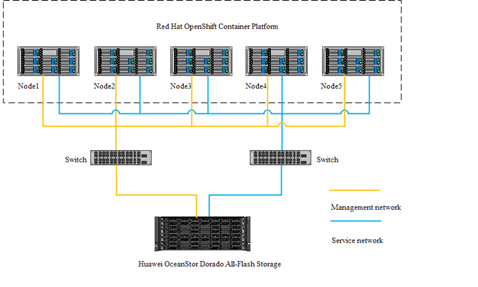
1.1 Test Networking Diagram
Figure 1 Test Networking Diagram
2 Hardware and Software Configurations
2.1 Hardware
| Hardware | Model | Number |
| Storage | OceanStor Dorado 6000 | 1 |
| Server | Huawei RH2288H V5 | 1 |
| Switch | Huawei CE6860 | 2 |
| Network adapter | Intel X520 | 1 |
2.2 Software
| Software | Version | Number |
| Red Hat OpenShift | 4.12-4.15 | 1 |
| VMware ESXi | 6.7 | 1 |
3 Test Cases and Records
1 The Storage and OpenShift with SAN
1.1 Install Huawei CSI through Helm
| Case ID | TestCase.001 |
| Test Purpose | To verify that the Huawei CSI plug-in can be installed through Helm |
| Test Networking | Figure 1 Test Networking Diagram |
| Prerequisites | 1. The storage system is running normally. 2. Red Hat OpenShift is running normally. 3. The network between the storage and OpenShift is connected correctly. |
| Test Procedure | 1. Import the image to the image repository. 2. Prepare the config file. 3. Start the Huawei CSI plug-in service and configure the storage. 4. Check the Huawei CSI plug-in service status. |
| Expected Result | 1. In step 3, the Huawei CSI plug-in service started successfully and the storage is configured successfully. 2. In step 4, the status of Huawei CSI plug-in service is running. |
| Test Result | 1. 1. In step 2, the Huawei CSI plug-in service is started successfully and the storage is configured successfully. The Huawei CSI plug-in service is started successfully.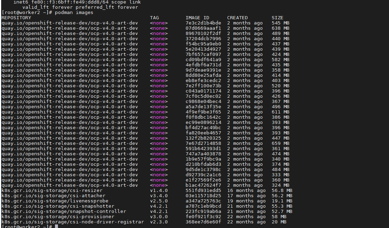 The storage is configured successfully. 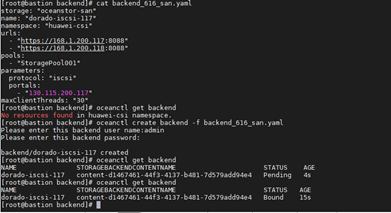 2. In step 4, the status of the Huawei CSI plug-in service is running.  |
| Test Conclusion | PASS |
1.2 Create, query and delete SC
| Case ID | TestCase.002 |
| Test Purpose | To verify that the SC can be created, queried and deleted successfully |
| Test Networking | Figure 1 Test Networking Diagram |
| Prerequisites | 1. The storage system is running normally. 2. Red Hat OpenShift is running normally. 3. The network between the storage and OpenShift is connected correctly. 4. Huawei CSI plug-in is configured and started normally. |
| Test Procedure | 1. Create and configure StorageClass config file. 2. Use oc create -f oceanstor-sc.yaml command to create SC. 3. Use oc get sc command to query SC. 4. Use oc delete sc command to delete SC. |
| Expected Result | 1. In step 2, SC is created successfully. 2. In step 3, SC is queried successfully. 3. In step 4, SC is deleted successfully. |
| Test Result | 1. In step 2, SC is created successfully. 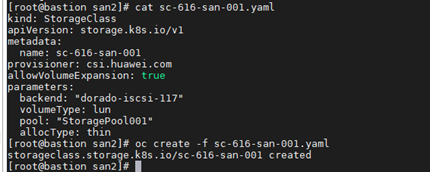 2. In step 3, SC is queried successfully.  3. In step 4, SC is deleted successfully.  |
| Test Conclusion | PASS |
1.3 Create, query and delete PVC
| Case ID | TestCase.003 |
| Test Purpose | To verify that the PVC can be created, queried and deleted successfully |
| Test Networking | Figure 1 Test Networking Diagram |
| Prerequisites | 1. The storage system is running normally. 2. Red Hat OpenShift is running normally. 3. The network between the storage and OpenShift is connected correctly. 4. Huawei CSI plug-in is configured and started normally. |
| Test Procedure | 1. Create and configure PersistentVolumeClaim config file, the capacity of lun is 200GB. 2. Use oc create -f oceanstor-pvc.yaml command to create PVC. 3. Use oc get pvc command to query PVC. 4. Use oc get pv command to query PV. 5. Use oc delete pvc oceanstor-pvc command to delete PV. |
| Expected Result | 1. In step 2, PVC is created successfully. 2. In step 3, PVC is queried successfully. 3. In step 4, PV is queried successfully, the corresponding lun of the PVC is created successfully on the storage. 4. In step 5, PVC is deleted successfully, the corresponding lun of the PVC is deleted on the storage. |
| Test Result | 1. In step2, PVC is created successfully. 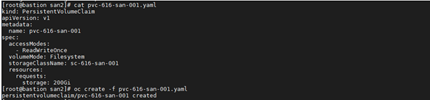 2. In step3, PVC is queried successfully.  3. In step 4, PV is queried successfully.  The corresponding lun of the PVC is created successfully on the storage. 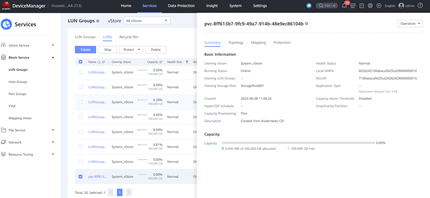 4. In step 5, PVC is deleted successfully.  The corresponding lun of the PVC is deleted successfully on the storage. 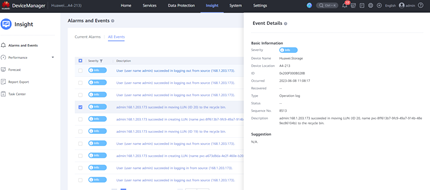 |
| Test Conclusion | PASS |
1.4 Create, query and delete Pod
| Case ID | TestCase.004 |
| Test Purpose | To verify that the Pod can be created, queried and deleted successfully |
| Test Networking | Figure 1 Test Networking Diagram |
| Prerequisites | 1. The storage system is running normally. 2. Red Hat OpenShift is running normally. 3. The network between the storage and OpenShift is connected correctly. 4. Huawei CSI plug-in is configured and started normally. |
| Test Procedure | 1. Create and configure the Pod config file. 2. Use oc create -f oceanstor-pod.yaml command to create Pod. 3. Use oc get pod command to query Pod. 4. Check the path information and status on the mount node. 5. Use oc delete pod command to delete Pod. 6. Check the path information and status on the mount node. |
| Expected Result | 1. In step 2, Pod is created successfully. 2. In step 3, Pod is queried successfully. 3. In step 4, the path number and status are correct. 4. In step 5, Pod is deleted successfully. 5. In step 6, All the paths are removed, no path information remain. |
| Test Result | 1. In step 2, Pod is created successfully. 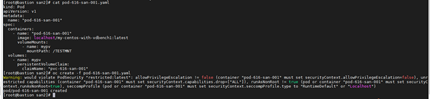 2. In step3, Pod is queried successfully.  Verify the corresponding lun of the PVC is created successfully on the storage. 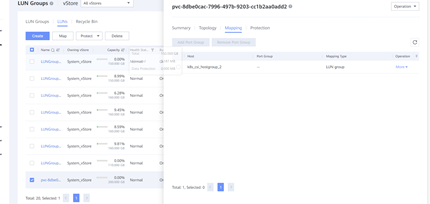 3. In step 4, the path number and status are correct.  4. In step 5, Pod is deleted successfully.  5. In step 6, All the paths are removed, no path information remain.  |
| Test Conclusion | PASS |
1.5 Configure storage Qos policy with CSI plug-in
| Case ID | TestCase.005 |
| Test Purpose | To verify the Qos policy can be configured on the storage with CSI plug-in |
| Test Networking | Figure 1 Test Networking Diagram |
| Prerequisites | 1. The storage system is running normally. 2. Red Hat OpenShift is running normally. 3. The network between the storage and OpenShift is connected correctly. 4. Huawei CSI plug-in is configured and started normally. |
| Test Procedure | 1. Create and configure StorageClass config file, and configure the qos parameter. 2. Create SC. 3. Create PVC. 4. Create Pod. |
| Expected Result | 1. In step 2, SC is created successfully. 2. In step 3, PVC is created successfully, the corresponding lun of the PVC is created on the storage with Qos policy configured in step 1. 3. In step 4, Pod is created successfully. |
| Test Result | 1. In step 2, SC is created successfully. 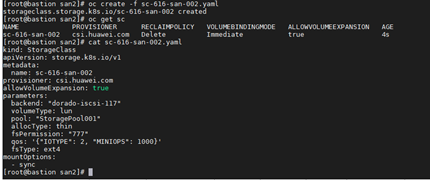 2. In step 3, PVC is created successfully. 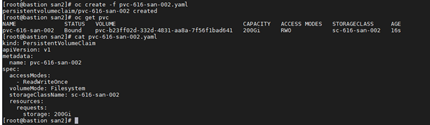 The corresponding lun of the PVC is created successfully on the storage with Qos policy. 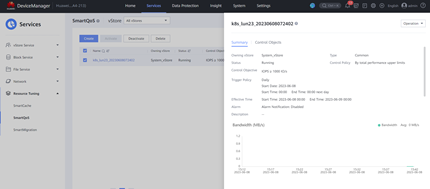 3. In step 4, Pod is created successfully. 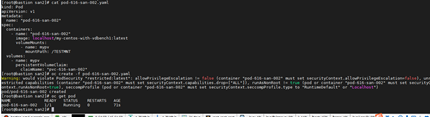 |
| Test Conclusion | PASS |
1.6 Configure PVC snapshot with CSI plug-in
| Case ID | TestCase.006 |
| Test Purpose | To verify the PVC snapshot can be configured successfully with CSI plug-in |
| Test Networking | Figure 1 Test Networking Diagram |
| Prerequisites | 1. The storage system is running normally. 2. Red Hat OpenShift is running normally. 3. The network between the storage and OpenShift is connected correctly. 4. Huawei CSI plug-in is configured and started normally. |
| Test Procedure | 1. Create a snapshot for the original PVC. 2. Check whether the snapshot is created successfully on the server. 3. Check whether the snapshot is created successfully on the storage. |
| Expected Result | 1. In step 2, the snapshot is created successfully on the server. 2. In step 3, the snapshot is created and actived successfully on the storage. |
| Test Result | 1. In step 2, the snapshot is created successfully on the server. The SC is created successfully.  The PVC is created successfully. 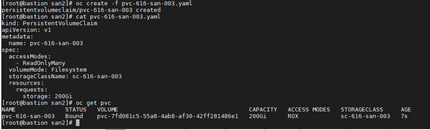 The snapclass is created successfully. 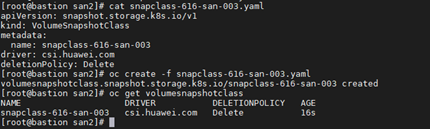 The VolumeSnapshotClass is created successfully.  2. In step 3, the snapshot is created and actived successfully on the storage. 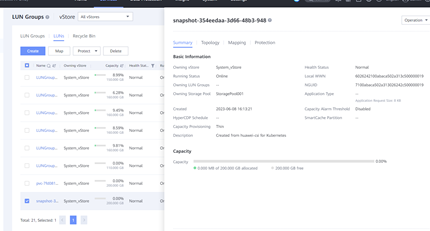 |
| Test Conclusion | PASS |
1.7 Delete snapshot
| Case ID | TestCase.007 |
| Test Purpose | To verify the snapshot can be deleted successfully with CSI plug-in |
| Test Networking | Figure 1 Test Networking Diagram |
| Prerequisites | 1. The storage system is running normally. 2. Red Hat OpenShift is running normally. 3. The network between the storage and OpenShift is connected correctly. 4. Huawei CSI plug-in is configured and started normally. 5. The snapshot of PVC is created successfully. |
| Test Procedure | 1. Delete the snapshot. 2. Check whether the snapshot is deleted successfully on the server. 3. Check whether the snapshot is deleted successfully on the storage. |
| Expected Result | 1. In step 2, the snapshot is deleted successfully on the server. 2. In step 3, the snapshot is deleted successfully on the storage. |
| Test Result | 1. In step 2, the snapshot is deleted successfully on the server.  2. In step3, the snapshot is deleted successfully on the storage. 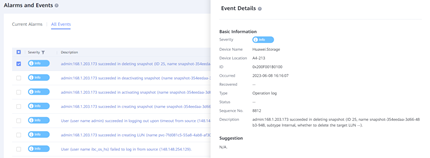 |
| Test Conclusion | PASS |
1.8 Configure PVC capacity expansion with CSI plug-in
| Case ID | TestCase.008 |
| Test Purpose | To verify the PVC can be expanded successfully with CSI plug-in |
| Test Networking | Figure 1 Test Networking Diagram |
| Prerequisites | 1. The storage system is running normally. 2. Red Hat OpenShift is running normally. 3. The network between the storage and OpenShift is connected correctly. 4. Huawei CSI plug-in is configured and started normally. |
| Test Procedure | 1. Configure the PVC name and capacity parameter. 2. Expand the PVC. 3. Check the capacity of the PVC. 4. Check the lun capacity on the storage. |
| Expected Result | 1. In step 3, the PVC is expanded successfully on the server. 2. In step 4, the corresponding lun of the PVC is expanded successfully on the storage. |
| Test Result | 1. In step 3, the PVC is expanded successfully on the server. The SC is created successfully. 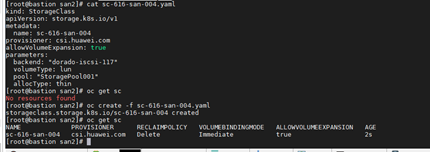 The PVC is created successfully. 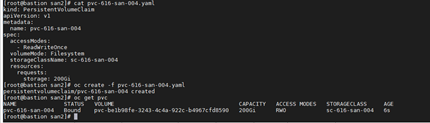 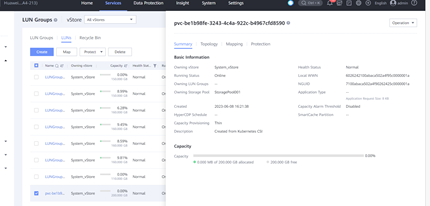 The PVC is expanded successfully.  2. In step 4, the corresponding lun of the PVC is expanded successfully on the storage. 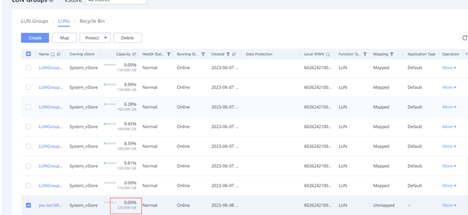 |
| Test Conclusion | PASS |
1.9 Configure PVC clone with CSI plug-in
| Case ID | TestCase.009 |
| Test Purpose | To verify the PVC can be cloned successfully with CSI plug-in |
| Test Networking | Figure 1 Test Networking Diagram |
| Prerequisites | 1. The storage system is running normally. 2. Red Hat OpenShift is running normally. 3. The network between the storage and OpenShift is connected correctly. 4. Huawei CSI plug-in is configured and started normally. |
| Test Procedure | 1. Configure the yaml file of SC. 2. Configure the yaml file of PVC. 3. Create SC. 4. Create PVC through clone. |
| Expected Result | 1. In step 3, the the SC is created successfully. 2. In step 4, the PVC is cloned successfully, the corresponding lun of the cloned PVC is created successfully on the storage. |
| Test Result | 1. In step 3, the SC is created successfully. 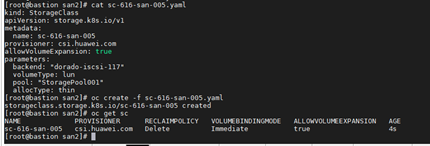 2. In step 4, the PVC is cloned successfully, the corresponding lun of the cloned PVC is created successfully on the storage. The PVC and Pod is created successfully. 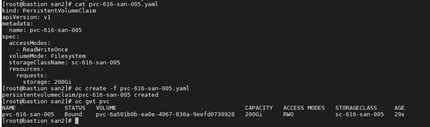 The corresponding lun of the original PVC is created successfully on the storage. 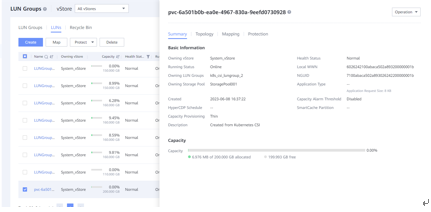 The Pod of the original PVC is created successfully. 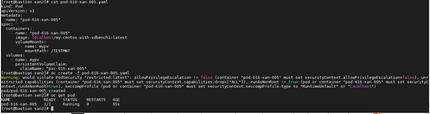 The test file in the Pod is created successfully. 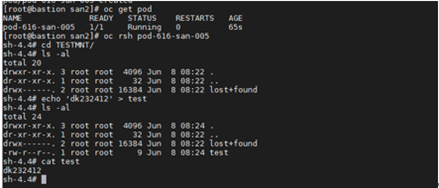 The Cloned PVC is created successfully. 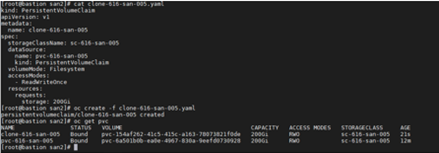 Verify the corresponding lun of the cloned PVC is created successfully on the storage; 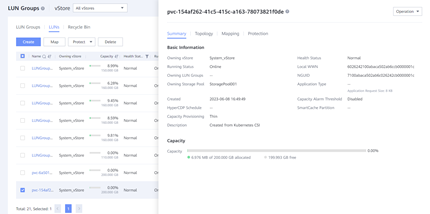 The corresponding lun of the cloned PVC is created successfully on the storage. 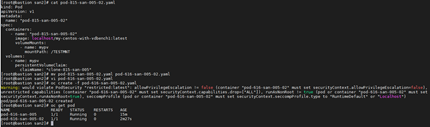 The contents in the test file are compared consistently. 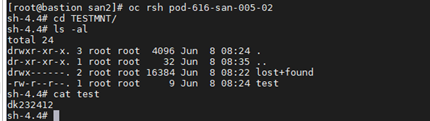 |
| Test Conclusion | PASS |
1.10 Create new lun from snapshot
| Case ID | TestCase.010 |
| Test Purpose | To verify the new lun can be created from snapshot successfully |
| Test Networking | Figure 1 Test Networking Diagram |
| Prerequisites | 1. The storage system is running normally. 2. Red Hat OpenShift is running normally. 3. The network between the storage and OpenShift is connected correctly. 4. Huawei CSI plug-in is configured and started normally. |
| Test Procedure | 1. Configure creating lun from the snapshot, the target capacity is greater than or equal to the capacity of the snapshot. 2. Check whether the new PVC is created successfully. 3. Check whether the new lun is created on the storage. 4. Check whether the data is consistent with the original PVC. |
| Expected Result | 1. In step 2, the new PVC is created successfully. 2. In step 3, the new lun is created successfully on the storage. 3. In step 4, the data is consistent with the original PVC. |
| Test Result | 1. In step 2, the new PVC is created successfully. Check the status of the original PVC and Pod successfully.  The test file is created successfully in the Pod. 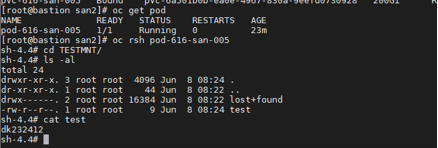 The snapclass is created successfully. 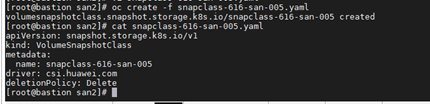 The snapshot is created successfully.  The snapshot is created successfully on the storage. 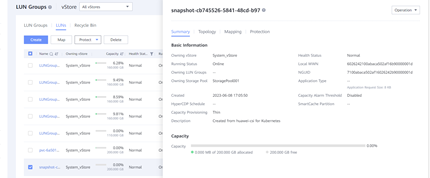 The new PVC is created successfully based on the snapshot. 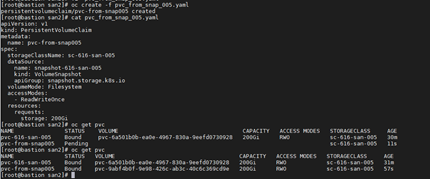 2. In step 3, the new lun is created successfully on the storage. 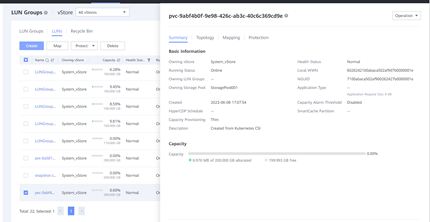 3. In step 4, the data is consistent with the original PVC. The Pod of new PVC is created successfully. 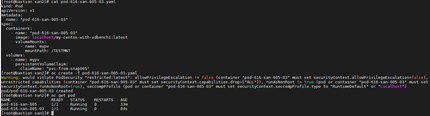 The contents in the test file are compared consistently. 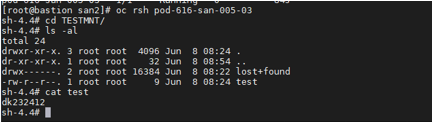 |
| Test Conclusion | PASS |
2 The Storage And OpenShift 4.12 with NAS
2.1 Install Huawei CSI through Helm
| Case ID | TestCase.011 |
| Test Purpose | To verify that the Huawei CSI plug-in can be installed through Helm |
| Test Networking | Figure 1 Test Networking Diagram |
| Prerequisites | 1. The storage system is running normally. 2. Red Hat OpenShift is running normally. 3. The network between the storage and OpenShift is connected correctly. |
| Test Procedure | 1. Import the image to the image repository. 2. Prepare the config file. 3. Start the Huawei CSI plug-in service and configure the storage. |
| Expected Result | 1. In step 3, the Huawei CSI plug-in service started successfully and the storage is configured successfully. 2. In step 4, the status of Huawei CSI plug-in service is running. |
| Test Result | 1. In step 2, the Huawei CSI plug-in service is started successfully and the storage is configured successfully. The Huawei CSI plug-in service is started successfully. 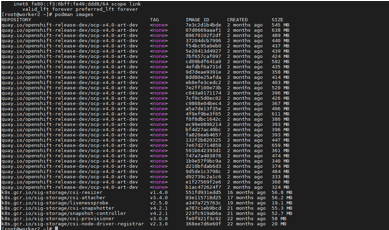 The storage is configured successfully. 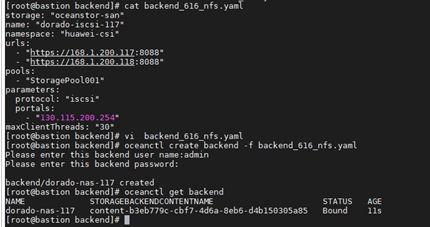 2. In step 4, the status of the Huawei CSI plug-in service is running.  |
| Test Conclusion | PASS |
2.2 Create, query and delete SC
| Case ID | TestCase.012 |
| Test Purpose | To verify that the SC can be created, queried and deleted successfully |
| Test Networking | Figure 1 Test Networking Diagram |
| Prerequisites | 1. The storage system is running normally. 2. Red Hat OpenShift is running normally. 3. The network between the storage and OpenShift is connected correctly. 4. Huawei CSI plug-in is configured and started normally. |
| Test Procedure | 1. Create and configure StorageClass config file. 2. Use oc create -f oceanstor-sc.yaml command to create SC. 3. Use oc get sc command to query SC. 4. Use oc delete sc command to delete SC. |
| Expected Result | 1. In step 2, SC is created successfully. 2. In step 3, SC is queried successfully. 3. In step 4, SC is deleted successfully. |
| Test Resu450 lt | 1. In step 2, SC is created successfully. 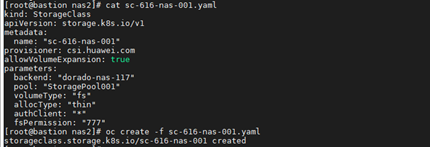 2. In step 3, SC is queried successfully.  3. In step 4, SC is deleted successfully.  |
| Test Conclusion | PASS |
2.3 Create, query and delete PVC
| Case ID | TestCase.013 |
| Test Purpose | To verify that the PVC can be created, queried and deleted successfully |
| Test Networking | Figure 1 Test Networking Diagram |
| Prerequisites | 1. The storage system is running normally. 2. Red Hat OpenShift is running normally. 3. The network between the storage and OpenShift is connected correctly. 4. Huawei CSI plug-in is configured and started normally. |
| Test Procedure | 1. Create and configure PersistentVolumeClaim config file, the capacity of filesystem is 200GB. 2. Use oc create -f oceanstor-pvc.yaml command to create PVC. 3. Use oc get pvc command to query PVC. 4. Use oc get pv command to query PV. 5. Use oc delete pvc oceanstor-pvc command to delete PVC. |
| Expected Result | 1. In step 2, PVC is created successfully. 2. In step 3, PVC is queried successfully. 3. In step 4, PV is queried successfully, the corresponding filesystem and share of the PVC is created successfully on the storage. 4. In step 5, PVC is deleted successfully, the corresponding filesystem and share of the PVC is deleted successfully on the storage. |
| Test Result | 1. In step 2, PVC is created successfully. 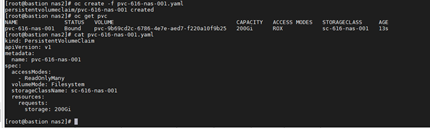 2. In step 3, PVC is queried successfully.  3. In step 4, PV is queried successfully.  The corresponding filesystem and share of the PVC is created successfully on the storage 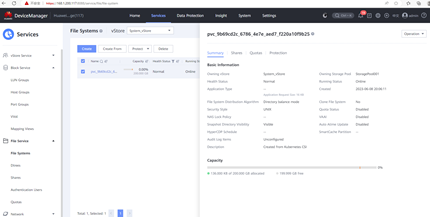 4. In step 5, PVC is deleted successfully.  The corresponding filesystem and share of the PVC is deleted successfully on the storage. 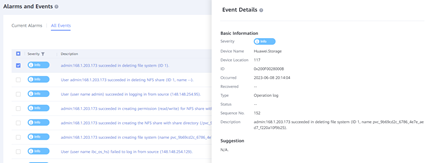 |
| Test Conclusion | PASS |
2.4 Create, query and delete Pod
| Case ID | TestCase.014 |
| Test Purpose | To verify that the Pod can be created, queried and deleted successfully |
| Test Networking | Figure 1 Test Networking Diagram |
| Prerequisites | 1. The storage system is running normally. 2. Red Hat OpenShift is running normally. 3. The network between the storage and OpenShift is connected correctly. 4. Huawei CSI plug-in is configured and started normally. |
| Test Procedure | 1. Create and configure the Pod config file. 2. Use oc create -f oceanstor-pod.yaml command to create Pod. 3. Use oc get pod command to query Pod. 4. Use oc delete pod command to delete Pod. |
| Expected Result | 1. In step 2, Pod is created successfully. 2. In step 3, Pod is queried successfully. 3. In step 4, Pod is deleted successfully. |
| Test Result | 1. In step 2, Pod is created successfully. PVC is created successfully.  Pod is created successfully. 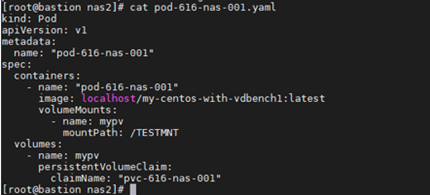  2. In step3, the Pod is queried successfully.  3. In step 4, the Pod is deleted successfully. 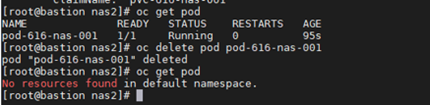 |
| Test Conclusion | PASS |
2.5 Configure storage Qos policy with CSI plug-in
| Case ID | TestCase.015 |
| Test Purpose | To verify the Qos policy can be configured on the storage with CSI plug-in |
| Test Networking | Figure 1 Test Networking Diagram |
| Prerequisites | 1. The storage system is running normally. 2. Red Hat OpenShift is running normally. 3. The network between the storage and OpenShift is connected correctly. 4. Huawei CSI plug-in is configured and started normally. |
| Test Procedure | 1. Create and configure the StorageClass config file, and configure the Qos parameter. 2. Create SC. 3. Create PVC. 4. Create Pod. |
| Expected Result | 1. In step 2, SC is created successfully. 2. In step 3, PVC is created successfully, the corresponding filesystem and share is created on the storage with Qos policy configured in step 1. 3. In step 4, Pod is created successfully. |
| Test Result | 1. In step 2, SC is created successfully. 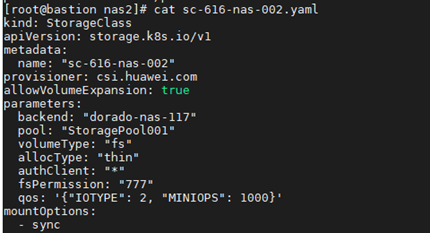  2. In step 3, PVC is created successfully. 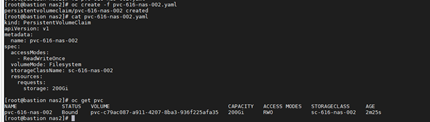 The corresponding filesystem and share is created successfully on the storage with Qos policy. 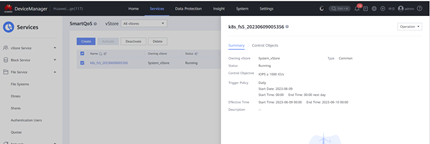 3. In step 4, Pod is created successfully. 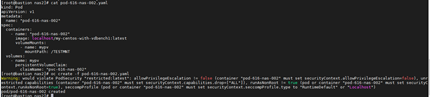 |
| Test Conclusion | PASS |
2.6 Configure PVC snapshot with CSI plug-in
| Case ID | TestCase.016 |
| Test Purpose | To verify the PVC snapshot can be configured successfully with CSI plug-in |
| Test Networking | Figure 1 Test Networking Diagram |
| Prerequisites | 1. The storage system is running normally. 2. Red Hat OpenShift is running normally. 3. The network between the storage and OpenShift is connected correctly. 4. Huawei CSI plug-in is configured and started normally. |
| Test Procedure | 1. Create snapshot for the original PVC. 2. Check whether the snapshot is created successfully on the server. 3. Check whether the snapshot is created successfully on the storage. |
| Expected Result | 1. In step 2, the snapshot is created successfully on the server. 2. In step 3, the snapshot is created and actived successfully on the storage. |
| Test Result | 1. In step 2, the snapshot is created successfully on the server. The SC is created successfully. 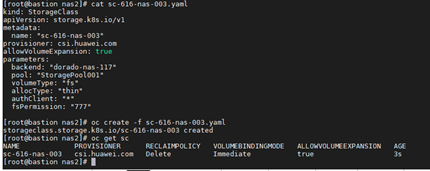 The PVC is created successfully. 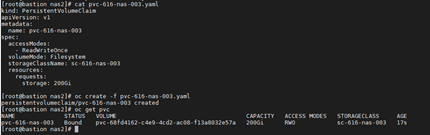 The Pod is created successfully. 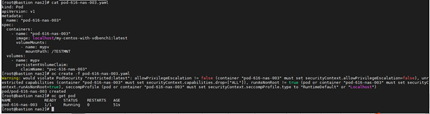 The test file is created successfully. 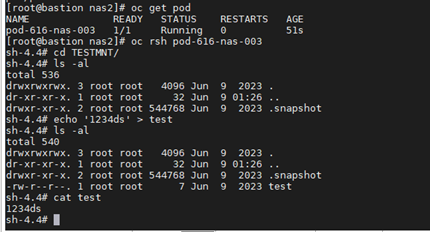 The snapclass is created successfully.  The snapshot is created successfully.  2. In step 3, the snapshot is created and actived successfully on the storage. 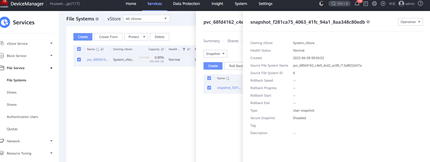 |
| Test Conclusion | PASS |
2.7 Delete snapshot
| Case ID | TestCase.017 |
| Test Purpose | To verify the snapshot can be deleted successfully with CSI plug-in |
| Test Networking | Figure 1 Test Networking Diagram |
| Prerequisites | 1. The storage system is running normally. 2. Red Hat OpenShift is running normally. 3. The network between the storage and OpenShift is connected correctly. 4. Huawei CSI plug-in is configured and started normally. 5. The snapshot of PVC is created successfully. |
| Test Procedure | 1. Delete the snapshot. 2. Check whether the snapshot is deleted successfully on the server. 3. Check whether the snapshot is deleted successfully on the storage. |
| Expected Result | 1. In step 2, the snapshot is deleted successfully on the server. 2. In step 3, the snapshot is deleted successfully on the storage. |
| Test Result | 1. In step 2, the snapshot is deleted successfully on the server.   2. In step3, the snapshot is deleted successfully on the storage. 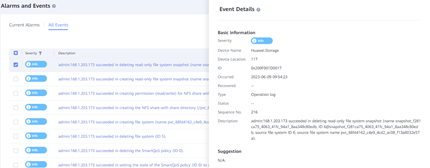 |
| Test Conclusion | PASS |
2.8 Configure PVC capacity expansion with CSI plug-in
| Case ID | TestCase.018 |
| Test Purpose | To verify the PVC can be expanded successfully with CSI plug-in |
| Test Networking | Figure 1 Test Networking Diagram |
| Prerequisites | 1. The storage system is running normally. 2. Red Hat OpenShift is running normally. 3. The network between the storage and OpenShift is connected correctly. 4. Huawei CSI plug-in is configured and started normally. |
| Test Procedure | 1. Configure the PVC name and capacity parameter. 2. Expand the PVC. 3. Check the capacity of the PVC 4. Check the filesystem capacity on the storage. |
| Expected Result | 1. In step 3, the PVC is expanded successfully on the server. 2. In step 4, the corresponding filesystem of the PVC is expanded successfully on the storage. |
| Test Result | 1. In step 3, the PVC is expanded successfully on the server. Check the capacity of the PVC after expansion.  2. In step 4, the corresponding filesystem of the PVC is expanded successfully on the storage.  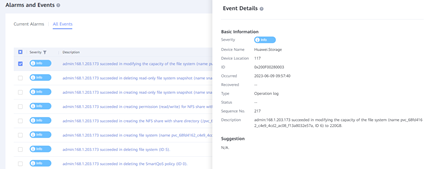 |
| Test Conclusion | PASS |
2.9 Configure PVC clone with CSI plug-in
| Case ID | TestCase.019 |
| Test Purpose | To verify the PVC can be cloned successfully with CSI plug-in |
| Test Networking | Figure 1 Test Networking Diagram |
| Prerequisites | 1. The storage system is running normally. 2. Red Hat OpenShift is running normally. 3. The network between the storage and OpenShift is connected correctly. 4. Huawei CSI plug-in is configured and started normally. |
| Test Procedure | 1. Configure the yaml file of SC. 2. Configure the yaml file of PVC. 3. Create SC. 4. Create PVC through clone. |
| Expected Result | 1. In step 3, SC is created successfully. 2. In step 4, PVC is cloned successfully, the corresponding filesystem of the cloned PVC is created successfully on the storage. |
| Test Result | 1. In step 3, SC is created successfully. 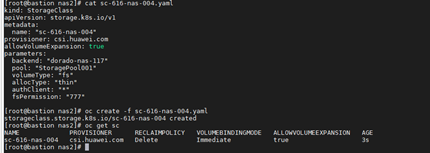 2. In step 4, the PVC is cloned successfully, the corresponding filesystem of the cloned PVC is created successfully on the storage. The original PVC is created successfully. 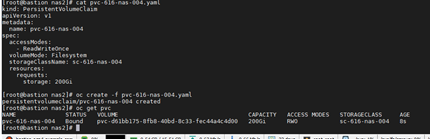 The Pod of the original PVC is created successfully. 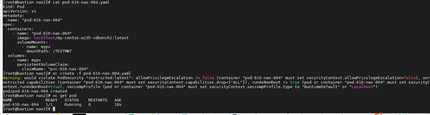 The test file is created successfully in the Pod. 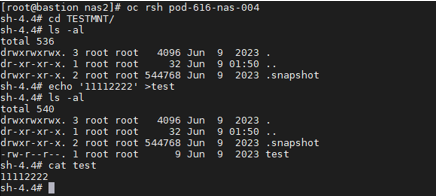 The Cloned PVC is created successfully. 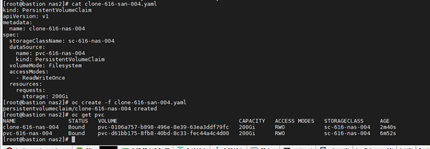 Verify the corresponding filesystem of the cloned PVC is created successfully on the storage 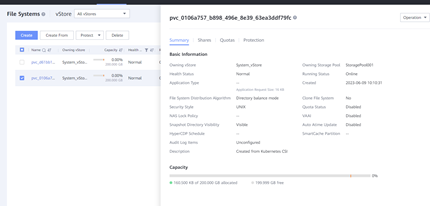 The Pod of the cloned PVC is created successfully. 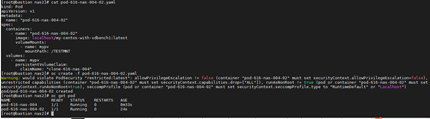 The contents in the test file are compared consistently. 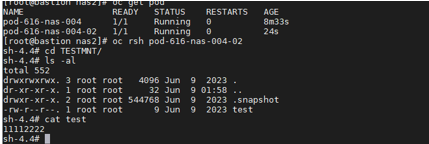 |
| Test Conclusion | PASS |
2.10 Create new filesystem from snapshot
| Case ID | TestCase.020 |
| Test Purpose | To verify the new filesystem can be created from snapshot successfully |
| Test Networking | Figure 1 Test Networking Diagram |
| Prerequisites | 1. The storage system is running normally. 2. Red Hat OpenShift is running normally. 3. The network between the storage and OpenShift is connected correctly. 4. Huawei CSI plug-in is configured and started normally. |
| Test Procedure | 1. Configure creating filesystem from snapshot, The target capacity is greater than or equal to the capacity of the snapshot. 2. Check whether the new PVC is created successfully. 3. Check whether the new filesystem is created on the storage. 4. Check whether the data is consistent with the original PVC. |
| Expected Result | 1. In step2, new PVC is created successfully. 2. In step 3, the new filesystem is created successfully on the storage. 3. In step 4, the data is consistent with the original PVC. |
| Test Result | 1. In step2, the new PVC is created successfully. The SC is created successfully. 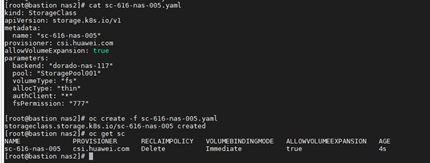 The original PVC is created successfully. 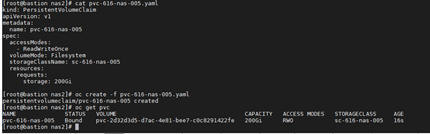 The test file is created successfully in the Pod. 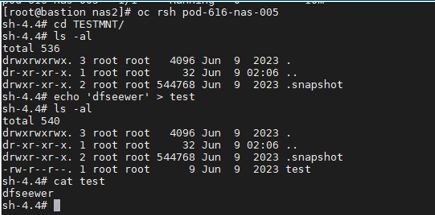 The snapclass is created successfully. 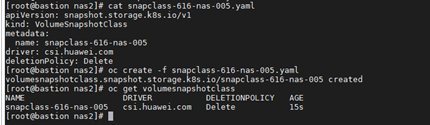 The snapshot is created successfully.  The snapshot is created successfully based on the PVC. 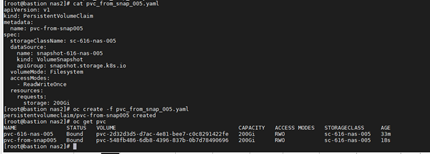 2. In step 3, the new filesystem is created successfully on the storage. 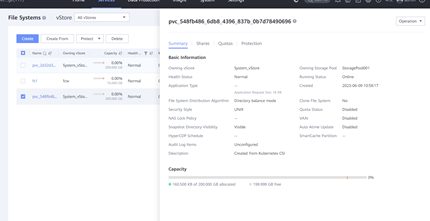 3. In step 4, the data is consistent with the original PVC. The Pod of new PVC is created successfully. 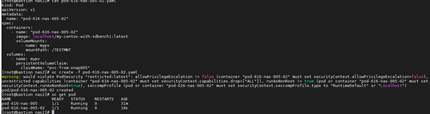 The contents in the test file are compared consistently. 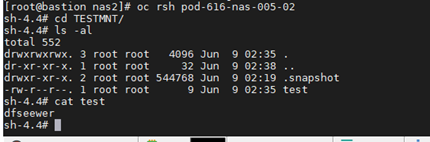 |
| Test Conclusion | PASS |
4 Acronyms and Abbreviations
| Acronyms and Abbreviations | Complete Name |
| PV | Persistent Volume |
| PVC | Persistent Volume Claim |
| SC | Storage Classes |
| lun | logical unit number |
